Square vs Toast for restaurants
Square and Toast both document restaurant ordering and kitchen workflows. Square also offers retail and appointment tools; Toast offers restaurant operations and retail products. Test your actual menu, table service and kitchen routing before comparing each complete offer.
Disclosure: Roots Payments is an independent Square Reseller. We earn revenue when businesses choose Square through us. This comparison is prepared by Roots Payments using the published sources linked below.
Square or Toast? Start here.
Both providers document restaurant workflows. Compare how each proposed setup connects your dining room, kitchen and online orders, then price the required devices, software and implementation together.
Consider Square when
You prefer published plan pricing and can budget the required add-ons
The proposed Square plan handles your café, quick-service or full-service workflows
Your operation combines restaurant and retail requirements that fit the proposed plan
Consider Toast when
Toast’s proposed configuration handles your required kitchen and service workflows
You want Toast’s payroll or restaurant add-ons and have priced the package
The itemized Toast offer works for your budget and contract requirements
See the software
Dining room floor plan
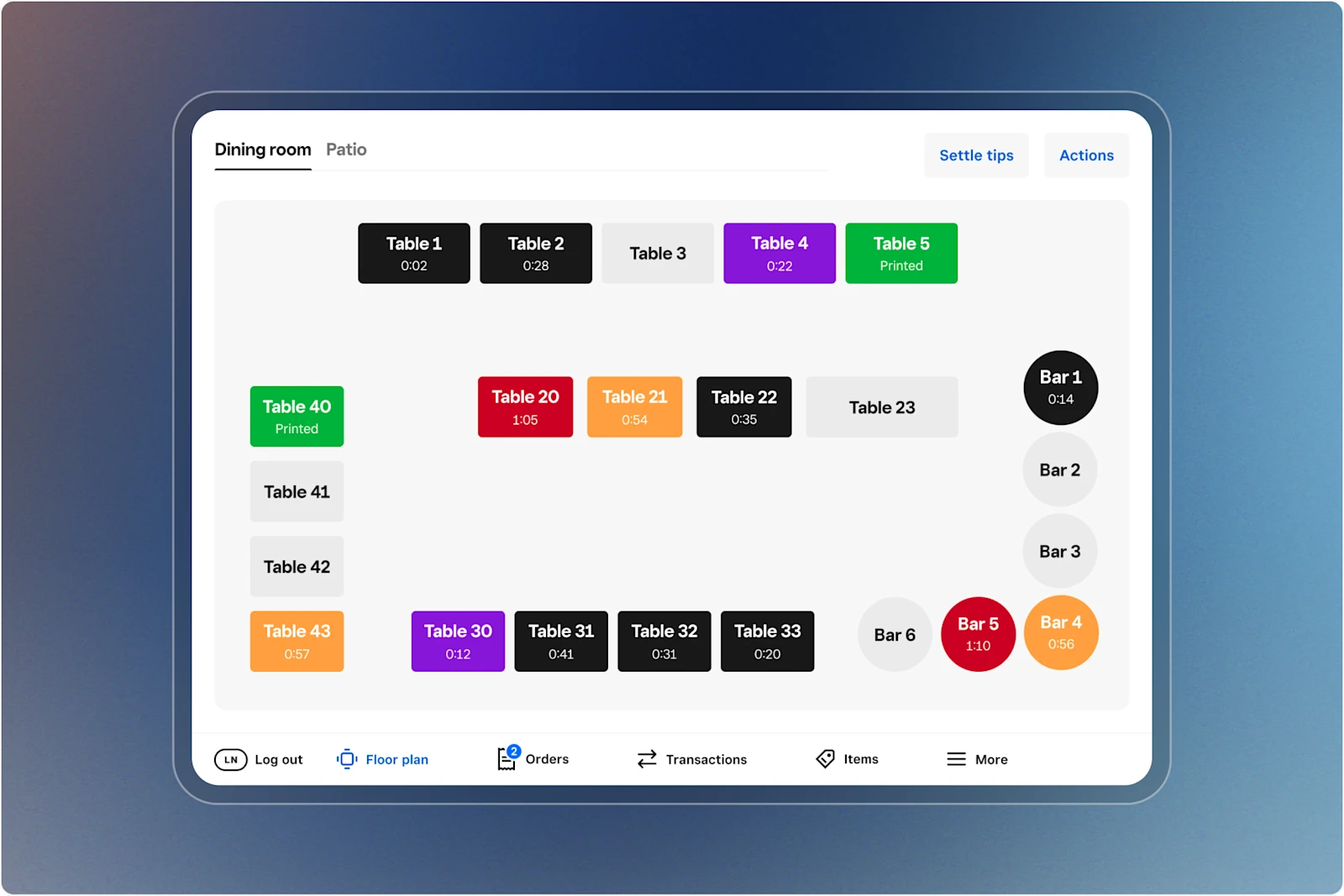
Table layout with open checks, timers and order navigation.
Source: Square · Enlarge screenshotOrder entry and add-ons
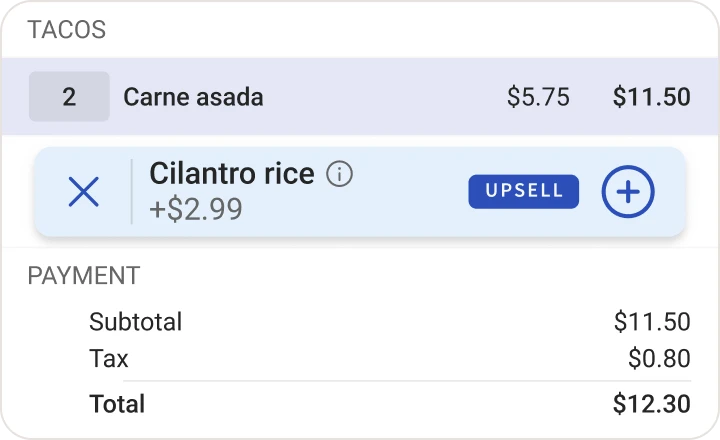
Order detail with an item, suggested add-on, tax and total.
Source: Toast · Enlarge screenshotFeatures and day-to-day operations
Compare the capabilities in the proposed plan. Some features require an upgrade, a separate app or compatible hardware.
Dining room and checks
Restaurant tools include table/seat management, coursing and split checks; confirm the plan.
Toast POS supports restaurant order management; demonstrate your table and check workflow.
Kitchen and prep stations
Square KDS routes tickets and provides order updates; its app fee is per device on paid plans.
Toast KDS documents station routing, ticket timers, modifier notes and course firing.
Orders across channels
Square documents connected in-store and online orders with delivery integrations.
Toast documents connected menus and off-premise orders routed to prep lines or KDS.
Hardware and cutover
Square offers counter and handheld devices; hardware and implementation are separate cost items.
Toast requires approved hardware; installation and package options affect upfront cost.
Pricing: what goes into the bill
Compare processing, software and equipment together. Published rates below are separate from hardware, implementation and any negotiated offer.
Card processing
In-person payments Free: 2.6% + 15¢ Plus: 2.5% + 15¢ Premium: 2.4% + 15¢ Online payments Free: 3.3% + 30¢ Plus: 2.9% + 30¢ Premium: 2.9% + 30¢
Request a written processing quote from Toast
Monthly software
Free: $0/mo. per location Plus: $49/mo. per location Premium: $149/mo. per location
Request a quote for software, hardware and add-ons
How to compare the total cost
Request a written Toast quote separating processing, software, approved hardware, KDS, add-ons and terms. Square online rates here refer to standard checkout or invoices; API payments are priced separately. Hardware and implementation add to either setup’s cost.
Processing charges + location subscriptions + device software + recurring apps + equipment payments.
Keep one-time hardware, setup and migration costs alongside that total. Use the same sales volume and transaction count for each offer, with in-person and online payments calculated separately.
A percentage rate alone leaves out the fixed fee on each transaction. Software can also change the result: count every location, required add-on and device subscription before deciding which offer costs less.
Plans, agreements and platform fit
Understand what you are buying, who supplies it and what happens when you change your setup.
For restaurants, compare the complete service setup
A restaurant POS has to connect the dining room, kitchen and off-premise orders. Compare the proposed configuration against your menu, modifiers and prep stations. A feature name on a pricing page cannot tell you whether the configured system matches the way your team works.
Price the required counter and handheld devices, kitchen displays and ordering connections together. Square KDS carries a separate per-device charge on paid plans; ask Toast to itemize its proposed KDS setup and add-ons. Include installation and training in both offers.
Map which orders go to each prep station and how staff handle changes.
Count POS and KDS devices, including their software charges.
Review installation, financing and cancellation terms before choosing a package.
What to request in the written quote
Ask each provider to itemize the same requirements. These are the details that turn an advertised package into an offer you can compare.
- 01
Required software plan, locations and POS devices
- 02
KDS devices and their recurring app or package charges
- 03
Processing rates and online-order payment mix
- 04
Hardware, installation, financing and Pay-as-You-Go terms
- 05
Add-ons, menu setup, training, renewal and cancellation terms
Plan the switch before cancelling anything
- 1.Data and catalog
Confirm what can be exported and imported. Map products, menu modifiers, customer records and gift cards; identify anything that must be rebuilt.
- 2.Hardware and integrations
Inventory terminals, printers and connected software. Get compatibility and recurring app requirements in writing before ordering replacements.
- 3.Staff and cutover
Schedule configuration, training and a cutover window. Check the current software, processing and equipment agreements before ending service.
Our recommendation
Both Square and Toast deserve consideration for a restaurant. Square’s published plans provide a starting point for budgeting; Toast requires an itemized offer for the configuration you need. Choose around your service pattern, kitchen routing and order channels, then compare the complete cost and commitments. Seat count alone is a poor shortcut for that decision.
See how we set up Square for restaurantsSources and review notes
This guide uses U.S. provider documentation. Published prices and features can change; use the plan and written agreement offered to your business when making a decision.
- 1.
Square pricing (official)
- 2.
Square hardware (official)
- 3.
Square restaurant workflows (official)
- 4.
Toast POS workflows (official)
- 5.
Toast KDS workflows (official)
- 6.
Toast pricing (official)
- 7.
Toast U.S. merchant agreement (official)
Toast is a trademark of its owner. Its appearance here does not imply affiliation or endorsement.
Related products and services


Related POS guides
Get help comparing your offers
Bring your processing statement, software bill and written quote. We can review the costs and scope a Square setup around your business.